Skip to content
HookTrader
Early access · Free plan open to everyone

TradingView alerts, executed on the exchange.

When your alert fires, HookTrader places the trade, sets stops and take-profits on the exchange, and manages the position until it closes. No code.

app.hooktrader.app/trades/btcusdt-long
BTCUSDTLONG · 3× TP · trailing-stop exitclosed · +1.71R+2.5R+2R+1.5R+1R+0.5R0R-0.5RTP3 +1.6R51,600TP2 +1.1R51,100TP1 +0.6R50,600ENTRY 0R50,000SL -1R49,00011:0511:1011:1511:20pnl +3.4% · +102.52 USDT · R +1.71R · dur 22m 20sHookBETrailTP3+1.71R

Stops live on the exchange

Your SL and TPs are orders on the exchange. They fire whether HookTrader is up or not.

Market-order triggers

Native algo orders fill at the trigger, even on a wick that gaps through it.

Keys encrypted, never withdrawal

Trade and read permissions only. Revoke on your exchange any time.

Paper trading, no keys needed

Run any strategy on live Binance or Bybit prices before you connect an account.

TradingViewHookTrader
  • BinanceLive and paper
  • BybitPaper now, live coming
More exchanges follow

Exchange names and logos are trademarks of their respective owners. HookTrader is not affiliated with, endorsed by or sponsored by any exchange.

Built for traders, not tinkerers.

Most webhook automation tools were built as hobby projects. HookTrader is built for people running real strategies on real money.

app.hooktrader.app/trades/btcusdt-sl-hit
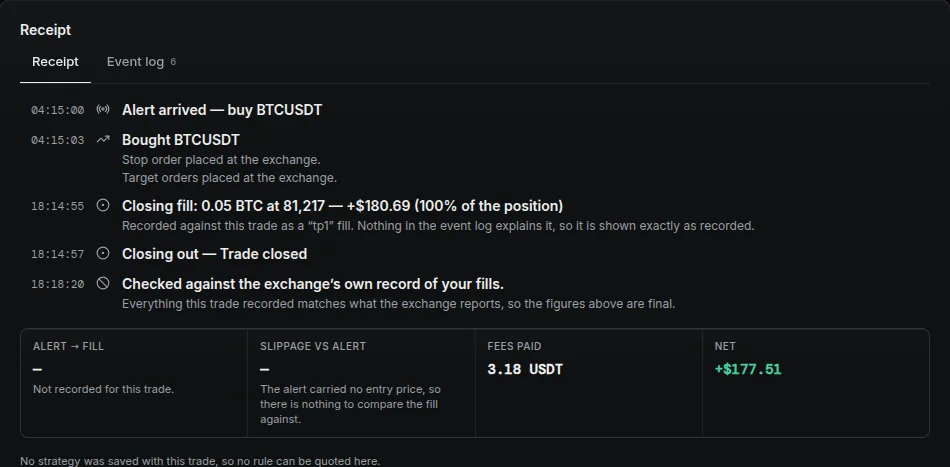
A trade's execution timeline: alert arrived, order filled, closing fill recorded, and the trade reconciled against the exchange's own fill record.

Market orders that always fill.

Stops and targets are placed as the exchange's own native orders. They fire as market orders the moment your trigger price is hit, even on a wick that gaps through it. Limit-based tools leave you exposed during the moves that matter most.
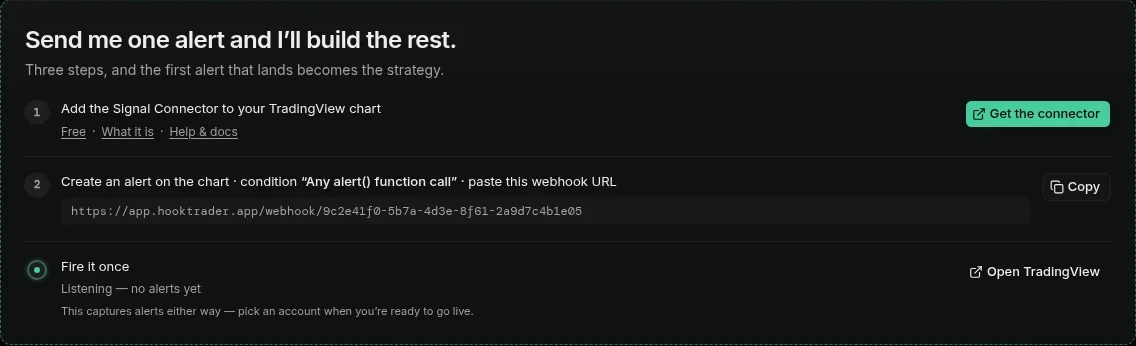

The Designer's three setup steps: add the Signal Connector to your TradingView chart, create an alert with the webhook URL, and fire it once.

Five-minute setup.

Connect your exchange key, paste the webhook URL into TradingView, fire your first alert. If you are not live in five minutes, we will work it through with you on the spot.

The Exchanges account table listing three paper accounts by name, each active and with its recent performance sparkline.

Every fill, reconciled.

Every fill, stop move, and take-profit hit is logged and checked against the exchange's own record.

  1. tp3
    TAKE_PROFIT_MARKET reduceOnlypre-stagedclose_position
  2. tp2
    TAKE_PROFIT_MARKET reduceOnlypre-stagedactivate_trailreduce_position 30%
  3. tp1
    TAKE_PROFIT_MARKET reduceOnlymove_sl_bereduce_position 30%
  4. entry
    MARKET fill
  5. sl
    STOP_MARKET reduceOnly

Up to ten take-profit levels.

Each level runs an ordered action list: move the stop to break-even, take a percentage off, start the trail, or close.

Trailing that lives on the exchange.

A target can start a trailing stop at a distance you set. HookTrader then keeps your exchange stop order that far behind the best price, tick by tick and never back, so it rests on the exchange whether or not your connection does.

Your trades, in Telegram.

Connect Telegram once. The HookTrader bot messages you when a trade opens, hits a target or stop, and closes, with its net P&L. Choose which events, per strategy.

See it before you connect anything.

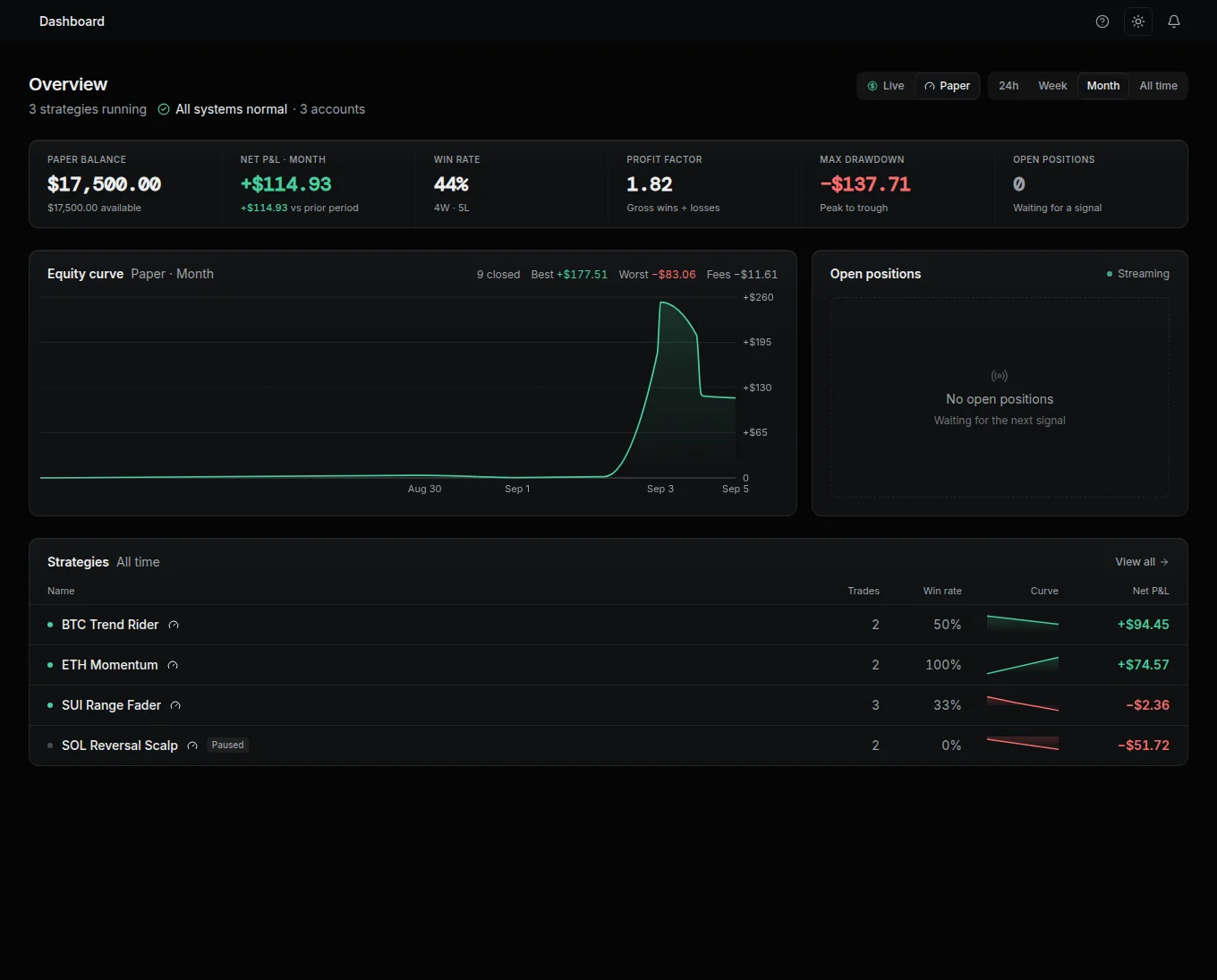
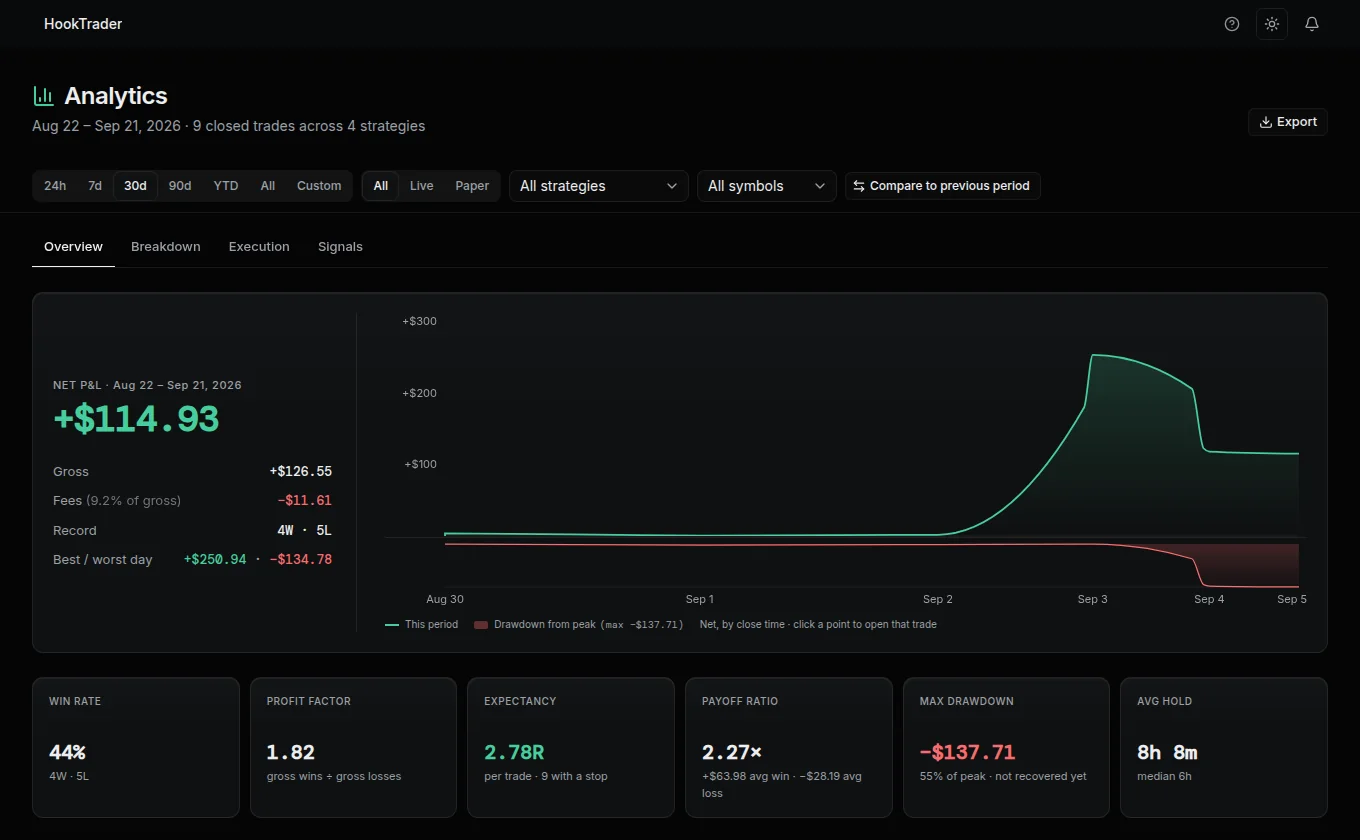
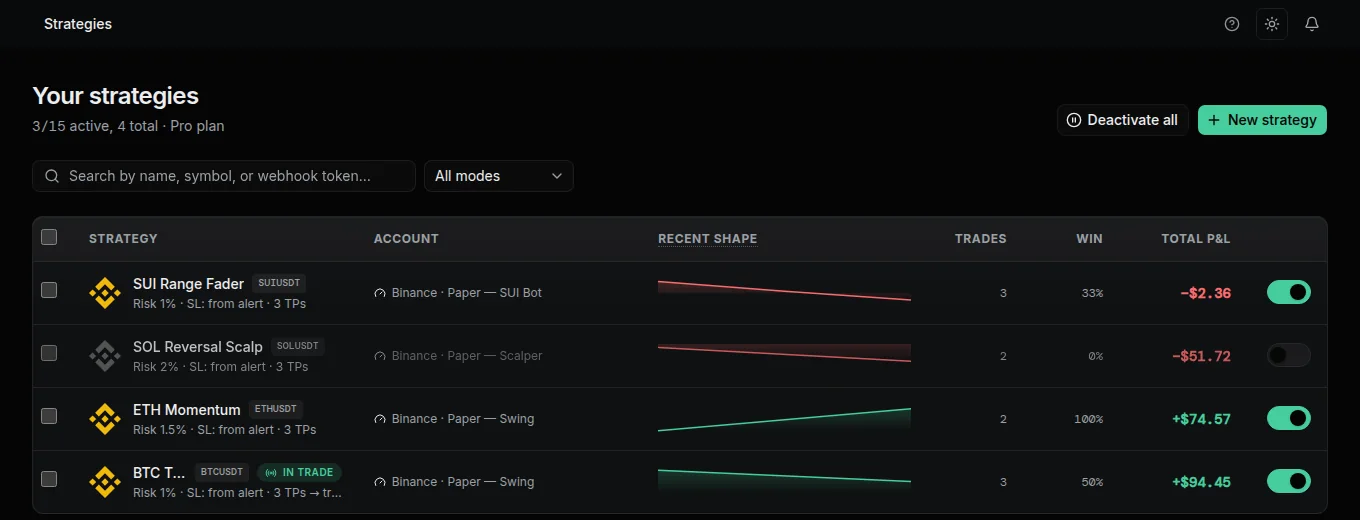
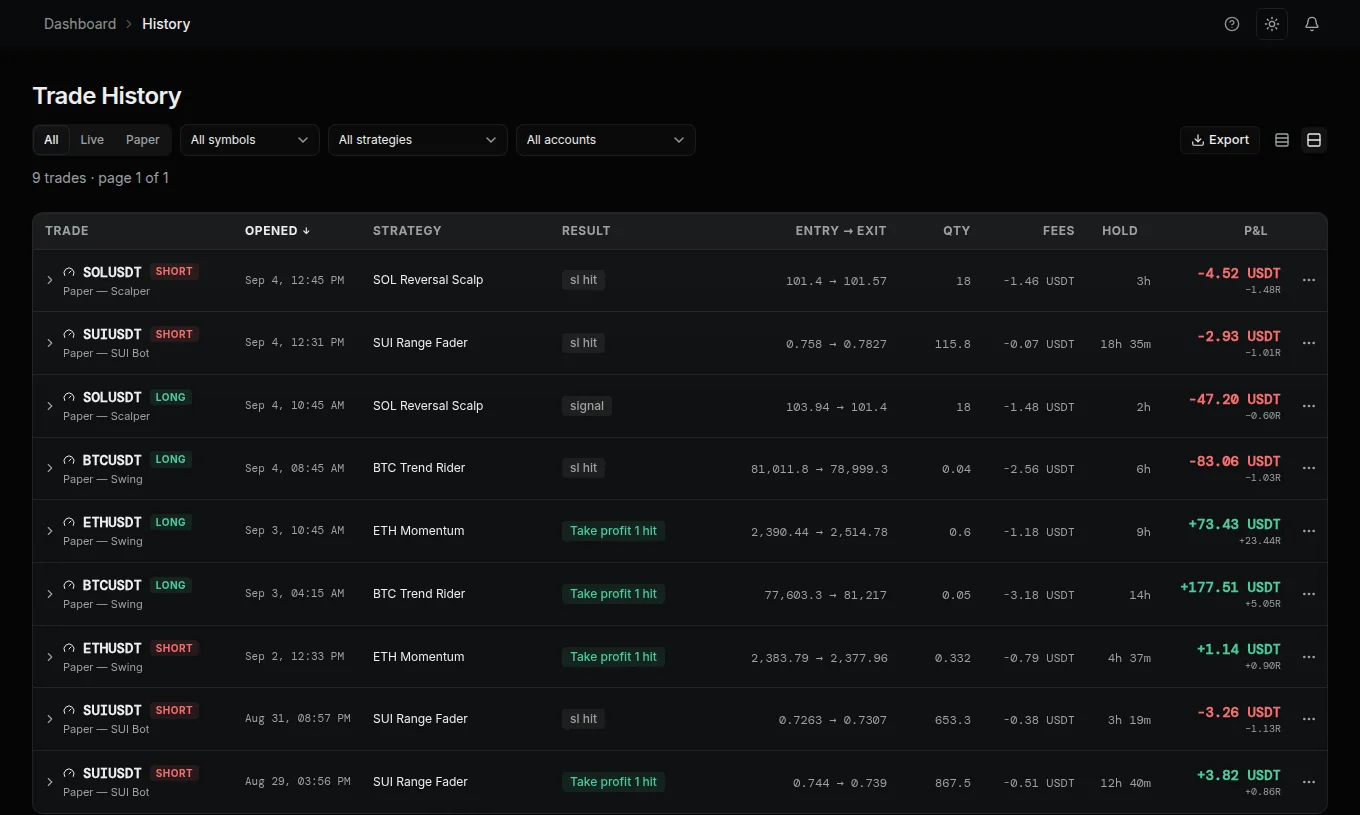
Every screen below is the real dashboard, running on paper-trading data — no live funds involved.

app.hooktrader.app/dashboard
The HookTrader dashboard: paper balance, net P&L, win rate, profit factor, and max drawdown above an equity curve and a ranked strategies table.
The Analytics page: net P&L for the period with a comparison chart, plus win rate, profit factor, expectancy, payoff ratio, max drawdown, and average hold time.
The Strategies table listing four strategies with their exchange account, recent P&L shape, trade count, and total P&L.
The Trade History table listing nine trades with symbol, result, entry and exit price, fees, and P&L.

Watch it in three minutes.

A walkthrough of connecting Binance, wiring a TradingView alert, and watching HookTrader manage the trade to close.

youtube.com/@hooktrader

From alert to fill in three steps.

  1. Connect your exchange.

    Live trading runs on Binance. Add your API key and we encrypt it before it touches our database. A paper account needs no key and follows Binance or Bybit prices, with more exchanges to come.

    API key••••••••••7f3a
    PermissionsFutures · Read
    WithdrawalsOff
  2. Paste your webhook.

    Each strategy gets its own webhook URL. Copy it into your TradingView alert and define your TP/SL plan in JSON — or pick a template and adjust.

    {
      "v": 2,
      "type": "entry",
      "symbol": "{{ticker}}",
      "ts": {{timenow}},
      "side": "long",
      "entry": {{close}},
      "sl": 49000,
      "tps": [51000, 52000],
      "qty": 0.01
    }
  3. Trade on alert.

    When TradingView fires your alert, HookTrader places the order, sets the brackets at your fill price, and manages the trade until it closes. You watch from the dashboard or get on with your day.

Why not a script, or another webhook bot?

Most of the difference is where your stops live and what happens when price gaps.

FeatureHookTraderDIY script
Stops and TPs are exchange ordersYesIf you build it
Triggers fill as market ordersYesIf you build it
Up to 10 TP levels with actionsYesNo
Paper trading with no API keysYesNo
Fills reconciled against exchange recordsYesNo
No code, no server to runYesNo

Based on publicly documented behaviour of common alternatives as of September 2026.

Frequently asked.

More questions answered in the full FAQ.

Put your next alert to work.

Create a free account and run it on paper today — no card, no invite. Want it live? Upgrade to Solo from Settings; it costs nothing during early access.

Need more than Solo? Apply for a Pro invite.

Free needs no card, no API key · Upgrade to Solo from Settings, free during early access · Pro is by invite · Start free instead