Skip to content
HookTrader
Free TradingView indicator · v1.2.0

Turn any TradingView signal into a complete trade plan.

The Signal Connector reads the buy and sell plots of the indicator you already use, draws the stop, targets, break-even and trailing stop on your chart, and sends one structured alert for every step. Point that alert at HookTrader and the plan executes on Binance Futures.

Free · Protected source · Adds no signals of its own

Published on TradingView as “Trade Plan Visualizer — SL/TP & Alerts”

tradingview.com · Trade Plan · BINANCE:ZECUSDT.P 1m
A TradingView chart with the Trade Plan indicator applied: three trades from an EMA-cross signal, each drawn as a red risk zone and a green reward zone with TP1 1R and TP2 2R labels, an amber stepped stop line that moves to break-even and then trails, and a corner data panel showing the connector name, configuration hash and position.

Free, for any indicator

Wire in the buy and sell plots of whatever you already trade with. It adds no signals of its own.

A plan you can see

Stop, targets, break-even and trailing drawn on the chart before a single alert fires.

Nothing to copy-paste

The indicator writes the alert JSON itself. One alert covers the whole trade.

Backtest in R

Replay the plan over the chart's history: win rate, profit factor, drawdown, streaks.

Everything between the signal and the fill.

Most signal indicators stop at an arrow on a bar. The connector picks up from there: where the stop goes, where the targets sit, when the stop moves, and what to tell the receiver at each step.

tradingview.com · Trade Plan
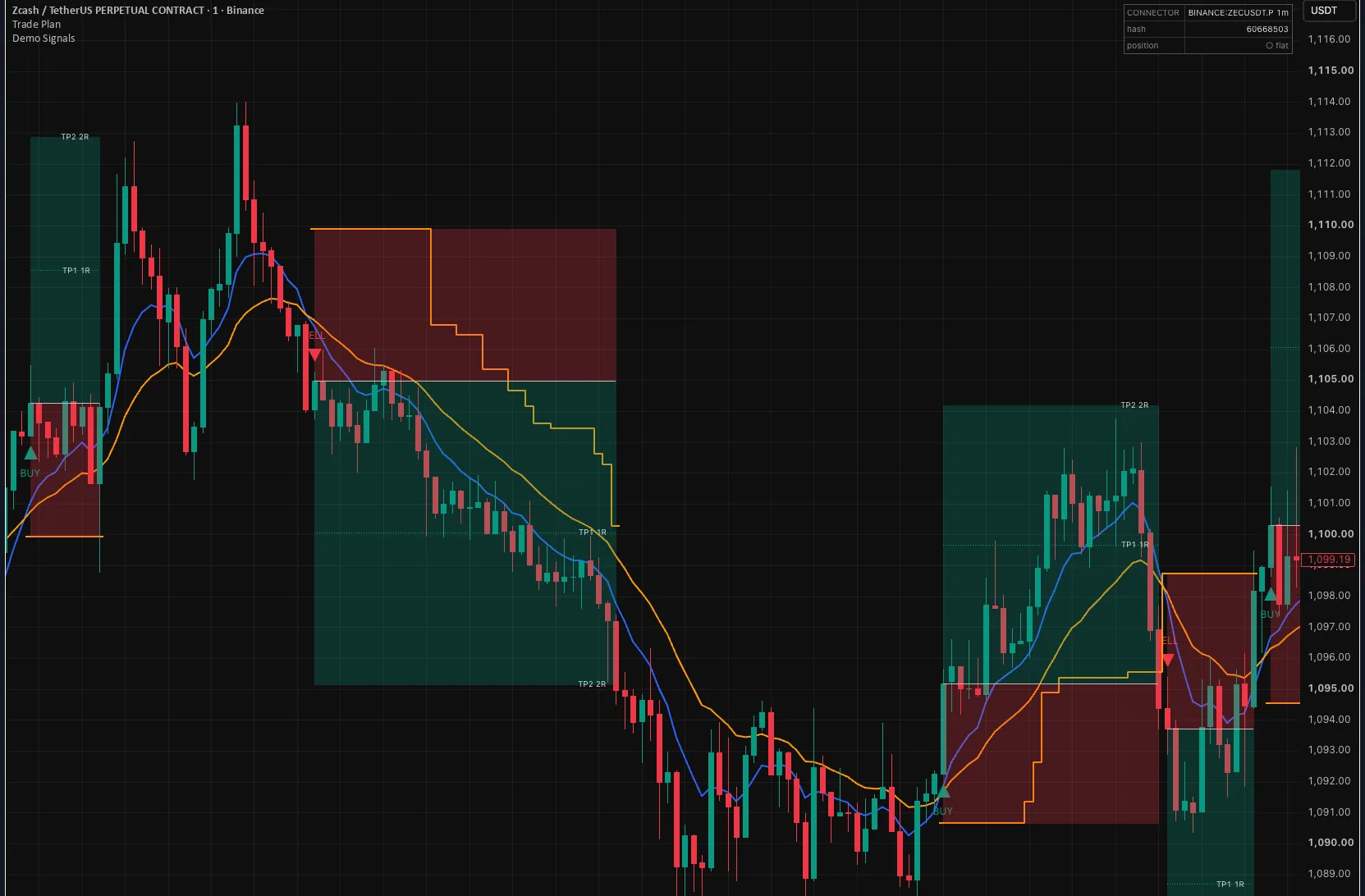
Three trades drawn by the Trade Plan indicator on a one-minute Zcash perpetual chart: shaded risk and reward zones, TP1 1R and TP2 2R labels, and an amber stepped stop line.

Zones, ladders and a stepped stop.

Each entry draws its risk and reward zones, a label per take-profit level, and a stop line that steps as break-even and trailing moves happen. What you see on the chart is what the alerts describe.
Reads any signal shape.

Zero-Line Pulse for one-bar markers, Value Change for step plots, Threshold for RSI over 50 or an EMA cross — no extra script.

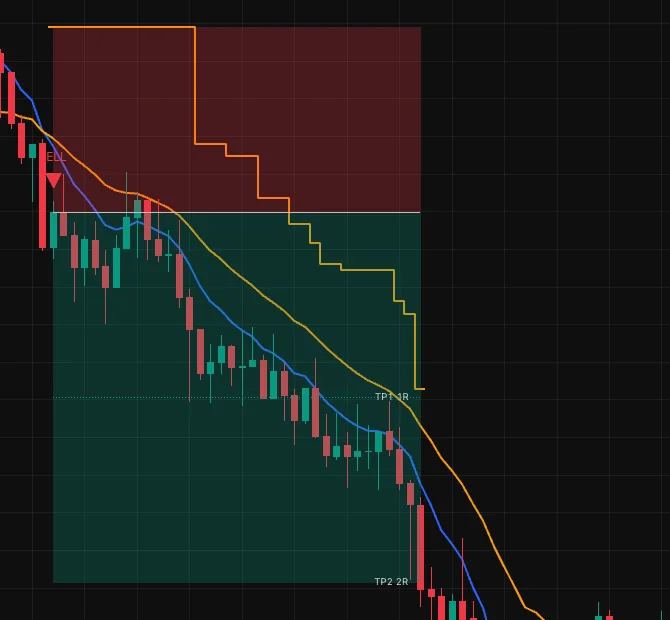
A short trade on the chart: the amber stop line steps down four times behind falling price, from the initial stop above the entry to well inside the reward zone.

Break-even and trailing, drawn as they happen.

Move the stop to entry after a chosen target, then trail it by ATR, percent or an external plot. The stop only ever tightens.

Up to ten targets, in R.

Every take-profit is a multiple of the initial risk, so one plan works on any symbol at any position size.

One alert, every step.

entry, tp_hit, move_sl, trail and exit share one client_id, so a receiver can follow the whole trade.

The panel that keeps you honest.

A configuration hash on the chart and in every alert. HookTrader shows the same number, so drift is visible before it costs a trade.

From chart to fill in four steps.

Two on TradingView, one in HookTrader, and the fourth happens by itself.

  1. Add it to your chart.

    Search TradingView's Indicators for Trade Plan Visualizer and add it next to your signal indicator.

  2. Wire in your signals.

    Set Long and Short Signal Source to your indicator's buy and sell plots, pick the reading mode that matches them, and choose how the stop, targets and trailing are placed.

  3. Create one alert.

    Condition: the indicator, "Any alert() function call". Paste the webhook URL from your HookTrader strategy. Leave the message box alone.

  4. Trade on alert.

    HookTrader sizes the position from your risk, places the stop and take-profits as native Binance orders, and follows every break-even and trail update the chart sends.

Full walkthrough with every setting in the Signal Connector guide.

What the alert actually says.

Every message is one line of JSON with a shared envelope. HookTrader's Signal Connector preset reads it with no mapping rules to write, and the schema is documented, so any webhook receiver can consume it.

entry
A new trade — side, entry price, stop, and the take-profit prices.
tp_hit
A take-profit level printed. The last level closes the trade.
move_sl
The stop moved to break-even. Sent once per trade.
trail
The trailing stop ratcheted. It never widens.
exit
The trade ended on the stop or an exit signal, with the reason.
config
A snapshot of the settings, on alert start and daily. HookTrader builds the strategy from it.

Every field, every event: events and payloads.

POST webhook.hooktrader.app/<token> · application/json
{
  "v": 2,
  "type": "entry",
  "symbol": "BTCUSDT",
  "ts": 1747140000000,
  "exchange": "BINANCE",
  "interval": "15",
  "is_test": false,
  "source": "signal-connector",
  "connector_version": "1.2.0",
  "price": 65000.0,
  "side": "long",
  "entry": 65000.0,
  "sl": 64000.0,
  "tps": [66000.0, 67500.0, 70000.0],
  "config_hash": 1976682332,
  "client_id": "BTCUSDT-1747140000-long"
}

Useful alone. Built for HookTrader.

The indicator is complete on its own. HookTrader is the part that turns the plan into orders.

On its own

Free, on any TradingView chart.

  • Draws the plan for any indicator's signals
  • Backtests it in R over the loaded history
  • Sends structured alerts to any webhook
  • Plot Inspector to find the right plot before wiring it

With HookTrader

The plan, executed on Binance USDⓈ-M Futures.

  • Strategy built from the config snapshot — nothing to map
  • Position sized from your risk and the stop distance
  • Stop and targets placed as native exchange orders
  • Break-even and trail updates applied as they arrive
  • A warning when the chart and the strategy disagree

Indicator questions.

More questions answered in the full FAQ.

Put a plan behind your next signal.

Add the indicator now — it's free — then create a free HookTrader account and watch it execute on paper. Live trading is by Solo invite.

Want live trading? Apply for a Solo invite.

Solo and Pro are by invite during early access · Free needs no card, no API key · Start free instead